Inhaltsfilter & Sicherheitsrichtlinien
Das Schutzsystem von Fami Hero scannt Webanfragen, Suchanfragen und Geräteinhalte, um unangemessene Inhalte zu blockieren. Als Administrator konfigurieren Sie globale Webfilter-Kategorien, verwalten vordefinierte Domain-Blacklists und steuern lokale Keyword-Wörterbücher.
🔍 1. Geräteeigenes Suchen & Textfiltern (On-Device)
Anstatt sich auf invasive Proxy-Weiterleitungen auf Netzwerkebene zu verlassen, erzielt Fami Hero eine leistungsstarke Web- und Suchsicherheit lokal auf dem Gerät des Kindes mithilfe von betriebssystemeigenen Funktionen und effizienten Scan-Algorithmen:
- On-Device Keyword-Abgleich: Die Kinder-App lädt ein zentrales Keyword-Wörterbuch vom Backend herunter und führt Echtzeit-Scans von Suchanfragen und Bildschirmtexten mit dem hocheffizienten Aho-Corasick-Multi-Pattern-Suchalgorithmus durch.
- Kennzeichnung verdächtiger Keywords: Wenn ein Kind nach expliziten, drogenbezogenen, Cybermobbing- oder gefährlichen Begriffen sucht oder darauf stößt, wird der Treffer lokal erkannt, protokolliert und sofort über die Realtime Database (RTDB) und Firebase Cloud Messaging (FCM)-Benachrichtigungen mit der Eltern-App synchronisiert.
- Betriebssystemeigenes App- & Kategorie-Blockieren: Das System ordnet Anwendungen bestimmten Kategorien zu (wie Soziale Medien, Spiele, Unterhaltung) und setzt strenge kategorieübergreifende Tageslimits oder vollständige Sperren direkt über native Plattform-Frameworks durch (Apples Screen Time API und Androids UsageStats / Service-Overlays).
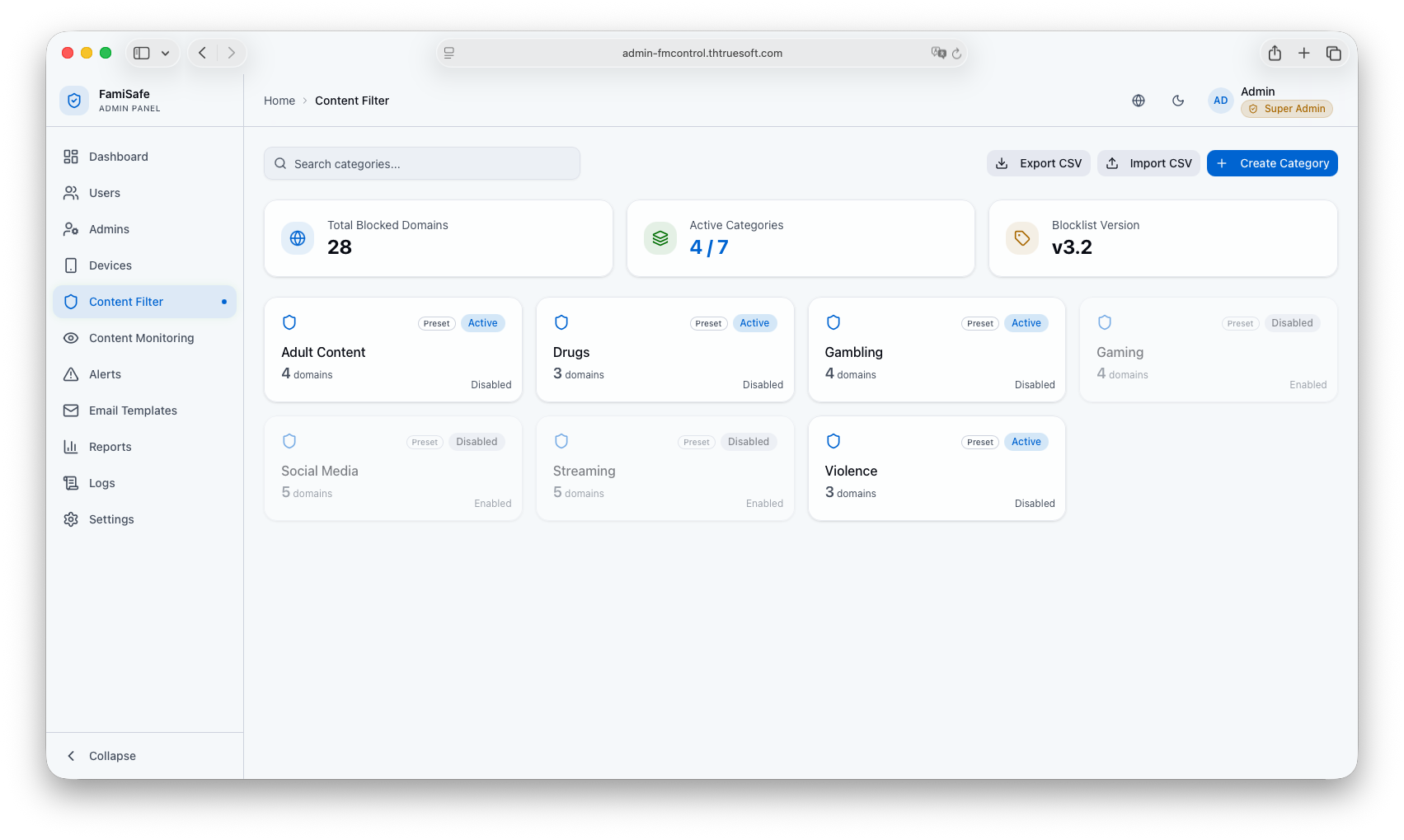 Bildunterschrift: Globale Web-Kategorisierungseinstellungen auf der Inhaltsfilter-Seite.
🚫 2. Globale Domain-Blacklists & Whitelists
Administratoren pflegen die globale Domain-Datenbank im Web-Admin-Portal, die automatisch über die Firebase Realtime Database mit den Geräten der Kinder synchronisiert wird:
Globale vordefinierte Kategorien & Blacklists
- Zweck: Blockieren von umfangreichen Listen unangemessener Websites standardmäßig.
- Domain hinzufügen: Klicken Sie auf eine Kategorie (z. B.
Adult Content,Gambling,Violence), wählen Sie Add Domain, geben Sie die Adresse ein (z. B.inappropriatesite.com) und klicken Sie auf Confirm. - Wildcards & Subdomain-Abgleich: Die nativen OS-Frameworks (wie iOS
ManagedSettingsStore.webContent) erzwingen automatisch den Subdomain-Abgleich (z. B. sperrt die Blockierung voninappropriatesite.comautomatisch auchwww.inappropriatesite.comoderplay.inappropriatesite.com).
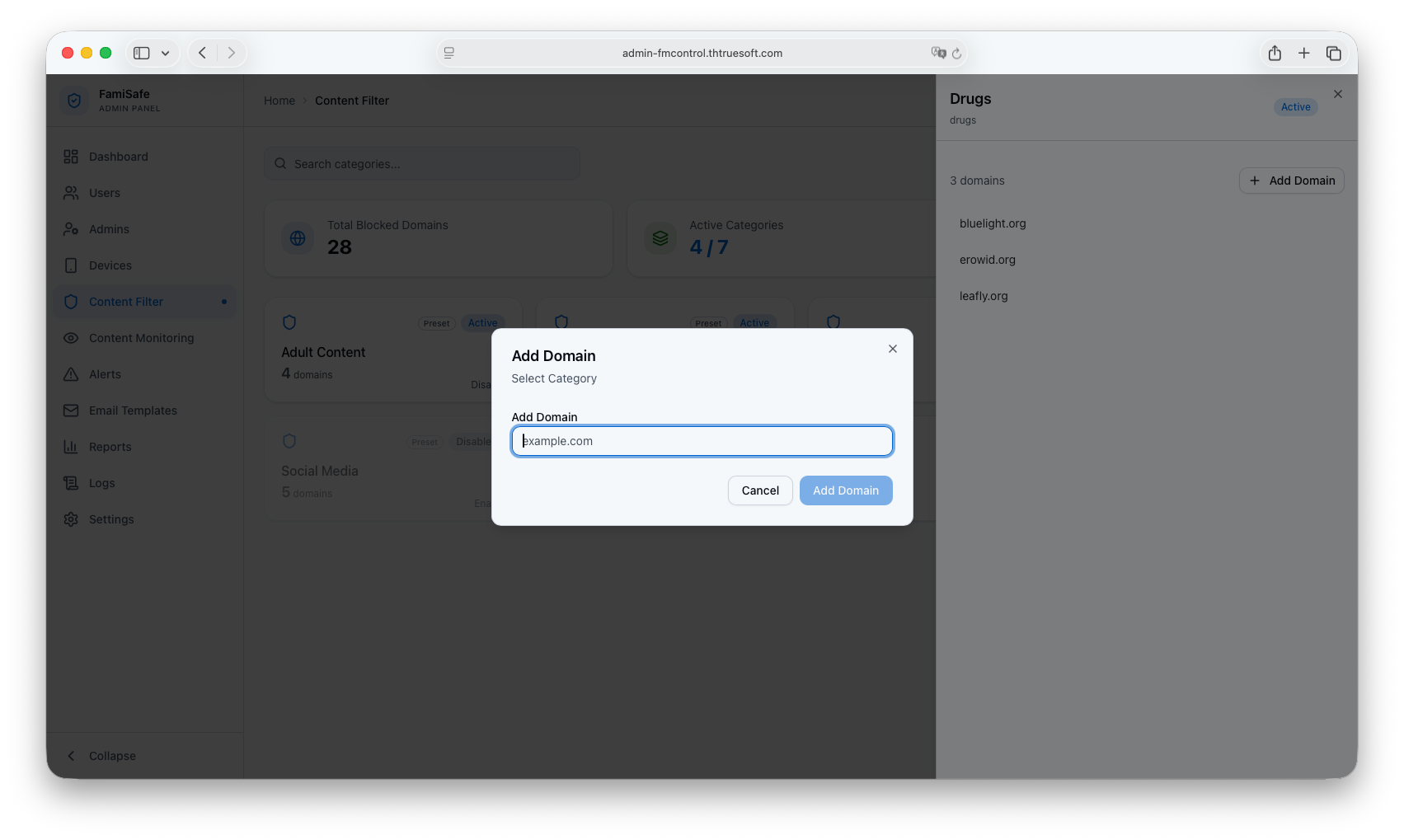 Bildunterschrift: Domain-Verwaltungselemente im Web-Admin-Portal.
Elterngesteuerte Whitelists & Blacklists
- Zweck: Ermöglicht es Eltern, globale Einstellungen lokal für die spezifischen Bedürfnisse ihrer Familie zu überschreiben (z. B. das Erlauben einer von der Schule genehmigten Website, die ansonsten blockiert wäre, oder das Blockieren einer bestimmten Gaming-Domain).
- Synchronisierung: Alle benutzerdefinierten Ausnahmen werden über die Backend-API gespeichert und sofort in Echtzeit mit der lokalen Richtlinienkonfiguration des Kindergeräts synchronisiert.
🛠️ 3. Globale Standardkonfigurationen & CSV-Workflows
Um die Verwaltung von Millionen von Domains und Keywords für Systemadministratoren skalierbar zu machen, unterstützt Fami Hero Bulk-Workflows:
- Plattform-Presets: Kategorien werden mit einem standardmäßig aktivierten Status initialisiert, um sicherzustellen, dass neue Kinderprofile sofort nach der Kopplung geschützt sind, ohne dass eine manuelle Konfiguration durch die Eltern erforderlich ist.
- Bulk-CSV-Import: Importieren Sie Tausende von blockierten Domains direkt in globale Kategorien mithilfe von strukturierten CSV-Dateien. Das Portal validiert die Datei-Header (
Category Name,Category ID,Domain) vor dem Import, um Datenbankfehler zu vermeiden. - Bulk-CSV-Export: Sichern oder exportieren Sie den aktuellen Domain-Blocklist-Datensatz mit einem einzigen Klick für Offline-Audits und Berichte.
⏭️ Nächster Schritt
Die Verwaltung von Benutzerkonten, Elternregistrierungen und Geräten ist die nächste administrative Kernaufgabe. Weiter zu Benutzer- & Geräteverwaltung.