Aktivitätsprotokolle & Sicherheitsprüfung
Das Fami Hero Admin-Portal führt ein umfassendes, schreibgeschütztes (read-only) Aktivitätsprotokoll aller administrativen Systemaktivitäten. Dies stellt die Einhaltung von Richtlinien sicher, verfolgt Änderungen bis zu den einzelnen Administratoren zurück und bietet einen wesentlichen Nachweis für Sicherheitsprüfungen der Plattform.
🔍 1. Aktivitätsprotokoll-Register
Route: /audit-logs
Jede kritische administrative Aktion löst sofort einen permanenten, unveränderlichen Protokolleintrag in der Systemdatenbank aus.
Suchen und Filtern:
- Suche: Finden Sie Protokolle durch Eingabe der E-Mail-Adresse eines Administrators, von Schlüsselwörtern der Aktionsbeschreibung oder der E-Mail-Adresse des Zielbenutzers.
- Aktionsfilter: Filtern Sie die Ergebnisse nach bestimmten protokollierten Aktionen, um wichtige Ereignisse einzugrenzen:
User Enabled / Disabled(Benutzer aktiviert/gesperrt): Verfolgung von Sperrungen und Freigaben von Eltern- oder Kinderkonten.Blocklist Updated(Sperrliste aktualisiert): Verfolgung von Änderungen an der globalen Datenbank zur Einstufung von Domänen.Config Updated(Konfiguration aktualisiert): Verfolgung von Änderungen an SMTP-Einstellungen, Firebase-Synchronisationslatenzen oder OTP-Gateways.Admin Actions(Administrator-Aktionen): Rückverfolgung, wenn Administratorkonten erstellt, aktiviert/deaktiviert oder Passwörter zurückgesetzt werden.Login Events(Anmeldeereignisse): Verfolgung von erfolgreichen und fehlgeschlagenen Anmeldeversuchen von Administratoren.
- Datumsfilter: Wählen Sie Start- und Endzeitstempel aus, um historische Aufzeichnungen anzuzeigen.
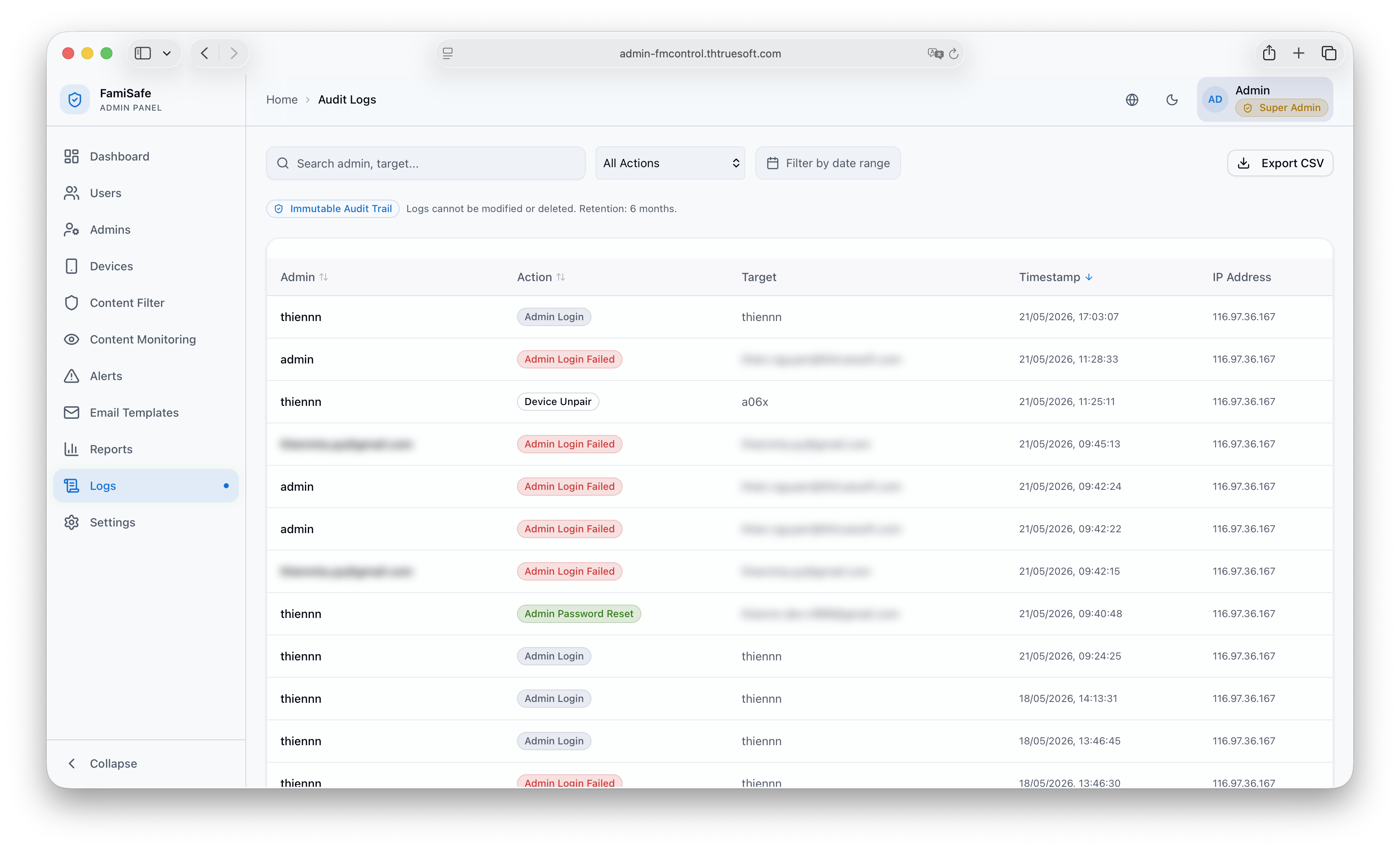 Bildunterschrift: Die Tabelle der Aktivitätsprotokolle mit Administrator-E-Mails, Aktionstypen, spezifischen Beschreibungen, IP-Adressen und Zeitstempeln.
🗃️ 2. Protokollierte Systemaktionen
Fami Hero protokolliert die folgenden Ereigniskategorien automatisch:
| Ereigniskategorie | Protokollierte Metadaten | Systemauswirkung |
|---|---|---|
| Admin-Login | Admin-ID, IP-Adresse, Session-Token | Validiert den Sitzungsstart des Administrators. Protokolliert auch fehlgeschlagene Anmeldeversuche. |
| Kontosperrung | Ziel-Eltern-ID, Status (Gesperrt/Aktiv), Grund | Verweigert der Eltern-App sofort den Zugriff. |
| Blacklist/Whitelist-Änderung | Betroffene Domäne, Aktion (Hinzufügen/Entfernen), Kategorie | Wird über die Firebase Realtime Database mit den Kindergeräten synchronisiert. |
| API-Schlüssel-Update | Gateway-Name (z.B. Twilio), Maskierte Zugangsdaten | Lädt die SMS- oder E-Mail-Versandparameter neu. |
📥 3. Exportieren von Audit-Berichten
Super-Administratoren können lokale Kopien der Aktivitätsprotokolle für Berichte oder externe Überprüfungen herunterladen:
- Navigieren Sie zu
/audit-logs. - Wenden Sie die gewünschten Datumsbereichs- oder Aktionsfilter an.
- Klicken Sie oben rechts auf Export Logs (Protokolle exportieren).
- Wählen Sie Ihr bevorzugtes Format: CSV (für Tabellenkalkulationen) oder JSON (für maschinelles Lesen).
- Erzwingen Sie die sekundäre 2FA-Verifizierung für Super-Admins, um den Download zu autorisieren.
- Die Datei wird nach erfolgreicher Verifizierung direkt auf Ihr Gerät heruntergeladen.
⏭️ Nächster Schritt
Administratoren können auch E-Mail-Inhalte, SMS-Benachrichtigungen und Firebase-Echtzeitdatenbank-Synchronisationspläne anpassen. Weiter zu Systemeinstellungen & Vorlagen.